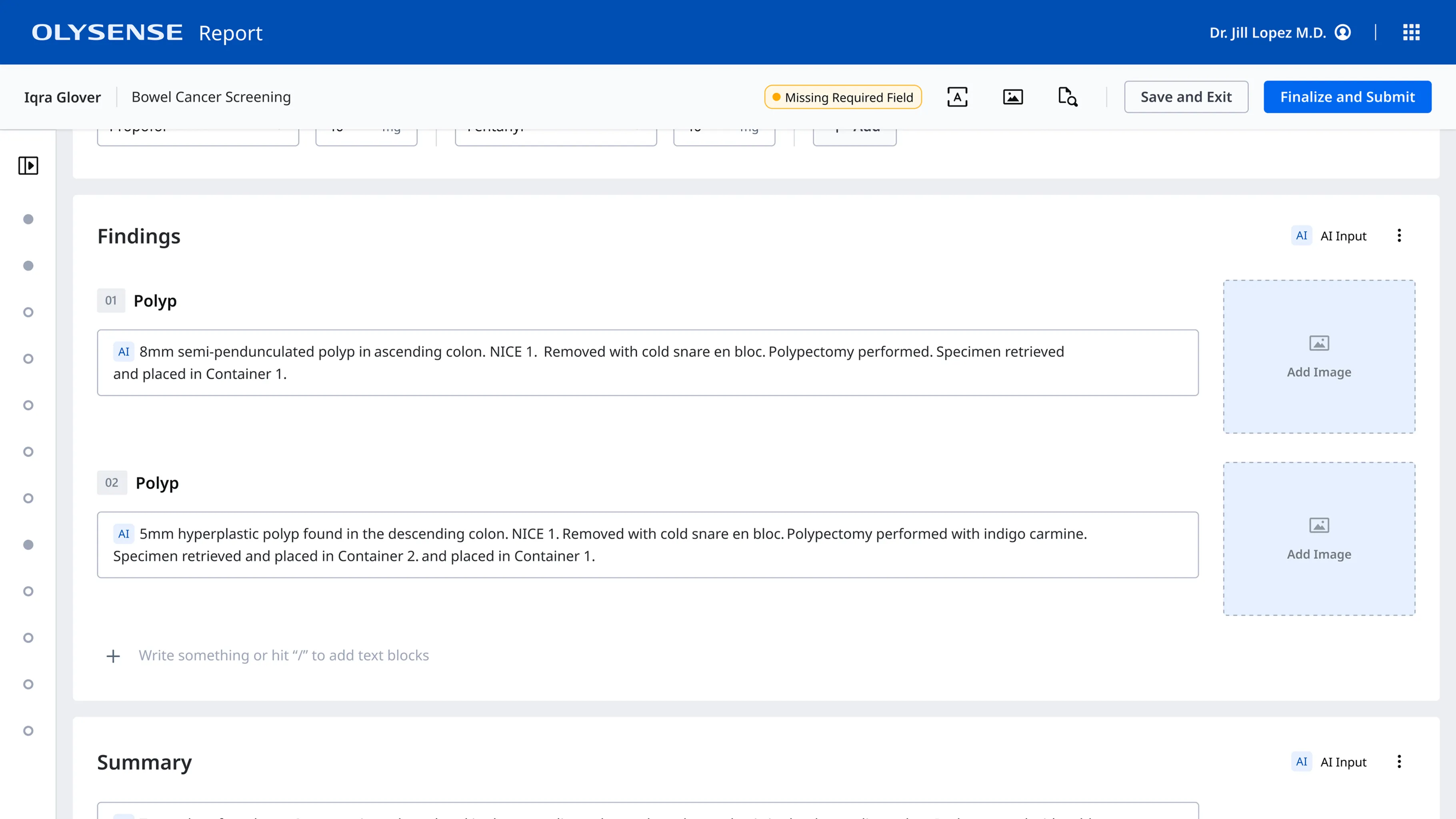
Gastroenterologists spend an average of 13 hours a week on documentation, leading to high levels of burnout.
The growing complexity of healthcare procedures and regulatory requirements has led to an increase in the amount and the complexity of documentation for each patient encounter.
At Olympus we explored a number of different avenues to simplify the documentation process, including the use of an ambient AI scribe to capture findings during endoscopic procedures.
Ambient scribes reduce the cognitive load during procedures
Traditionally, endoscopists have had to rely on their memory to recall the details of a procedure in order to document it after the fact.
In more complicated procedures with multiple findings, they typically ask the procedure nurse to write down the details of their findings and therapies performed. For example, they might record the size, location, and characteristics of a polyp, along with what type of resection they performed and what container the biopsy is in.
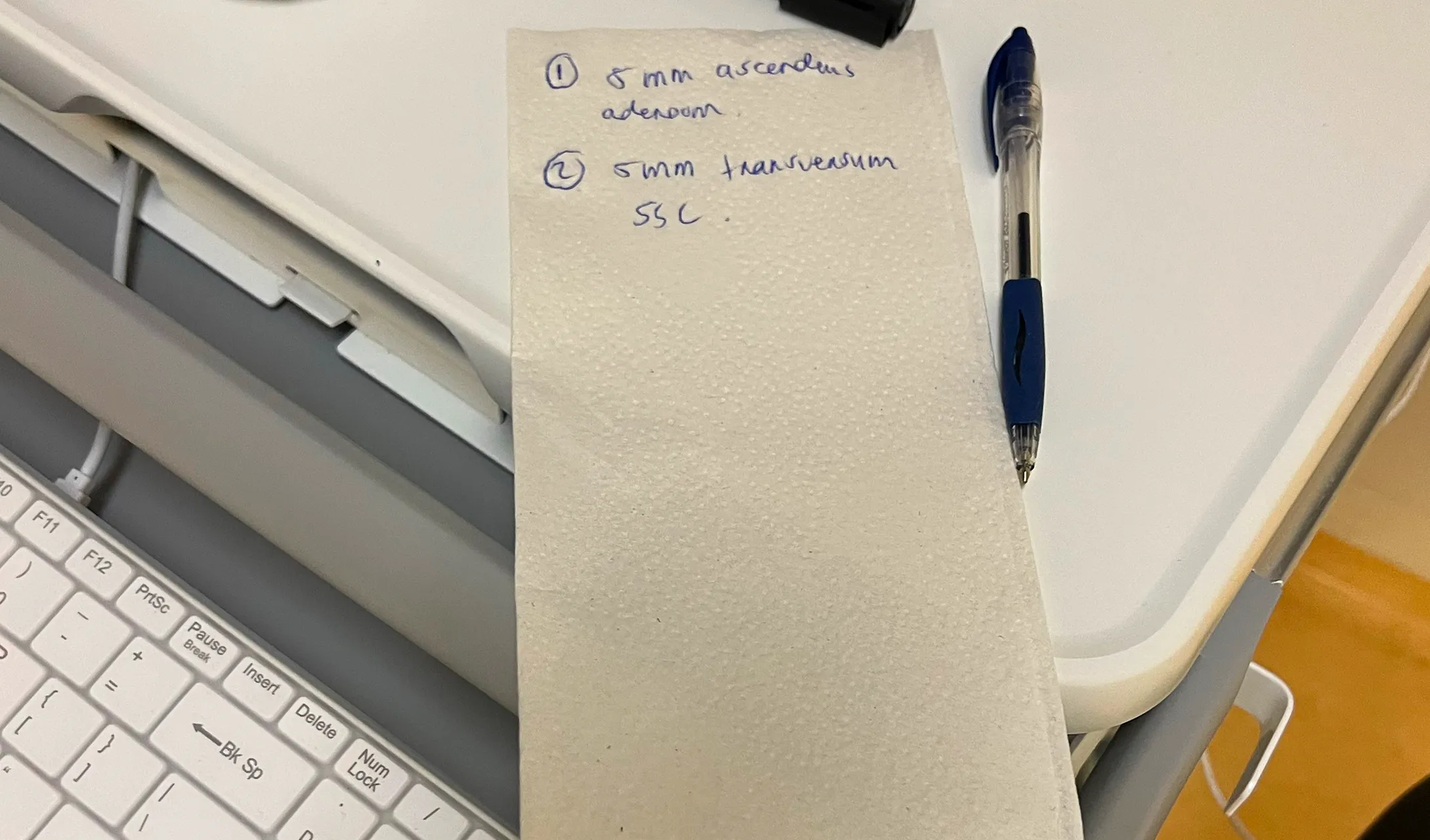
These details are frequently captured on post-it notes, napkins, and other scraps of paper, which introduces the potential for that information to get lost or damaged. It also distracts the nurse from their primary tasks.
With an AI scribe, endoscopists are able to speak these details aloud and can be confident that the AI scribe is capturing everything and adding it to their report.
Because of ability to use voice I won’t forget things that I’ve seen. If I see something on the way in and then on the way out, I completely forget that I’m looking for something like that. Then at least I’ve got a recording of me seeing something on the way in and then it’s already written down.”
Physicians were excited, but had concerns about control and accuracy
Our UX Researcher conducted interviews with 12 endoscopists to gauge their interest in a voice solution and identify any concerns they had.
Some of the key takeaways from this research were:
- Doctors were very excited about using voice during a procedure and believed it would save them a significant amount of time
- Most regularly used technologies like Siri or Alexa ane were comfortable with voice interfaces
- Doctors wanted to be able to control when the scribe was recording
- They wanted to be sure that the scribe would be able to capture the nuances of an endoscopic procedure and filter out side conversations
User testing a voice interface presented unique challenges
I wanted to test my inital user flow with endoscopists early on to make sure I was on the right track, but because the primary interface was the doctor’s voice it wasn’t exactly something I test in Figma.
Prototyping with video
I worked with our in-house subject matter experts to create a realistic transcript of a colonoscopy procedure and used ElevenLabs to turn it into an audio recording. Then I put together a 5 minute video using the audio track, images from a procedure room, and a Figma prototype to show what the doctors and nurses would see on the monitor during the procedure.
The video demonstrated how doctors could use vocal commands to start and stop the recording and showed real time feedback on the monitor so they could be confident it was recording when they wanted and only when they wanted. It also included a handful of off topic conversations.
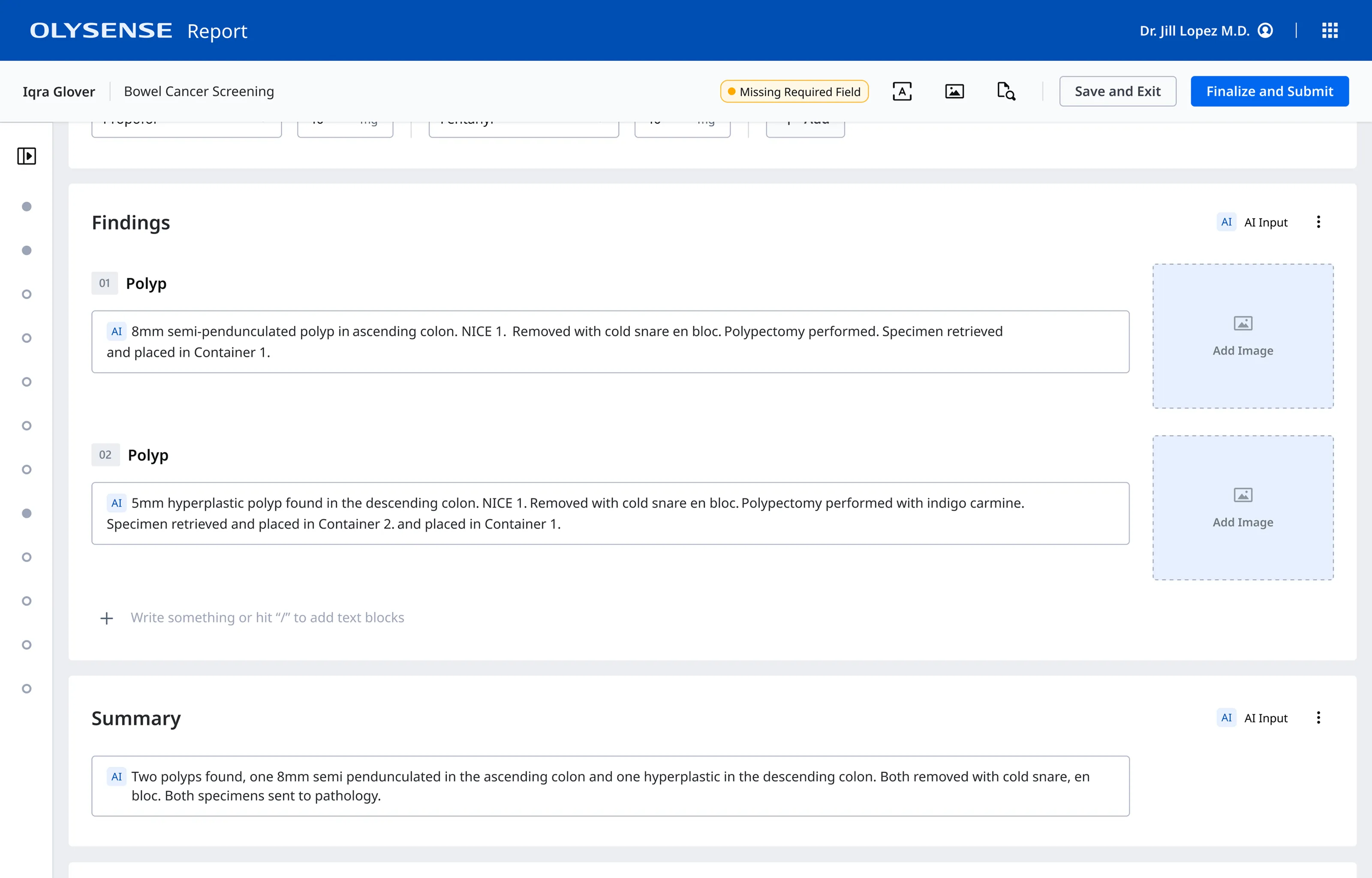
I also created a prototype of the post procedure report so that the endoscopists could see that the relevant information had been captured and mapped to the report in a structured format. This also reassured them that their side conversations would not accidentally end up in the report.
If this works it is a dream. If we can add all this information while we are doing the procedure and it works well and goes to the report and we just basically have to validate that’s amazing. I mean it’s really a good thing.
The biggest design challenge wasn’t the UI - it was coordinating across teams.
The intra-procedure experience and post procedure report writing experience were owned by different teams, each with their own roadmaps and delivery constraints.
I partnered closely with the designers, engineers, and product managers from both teams to craft an end-to-end voice experience that spanned multiple touchpoints and integrated into their existing designs without risking their delivery timelines.
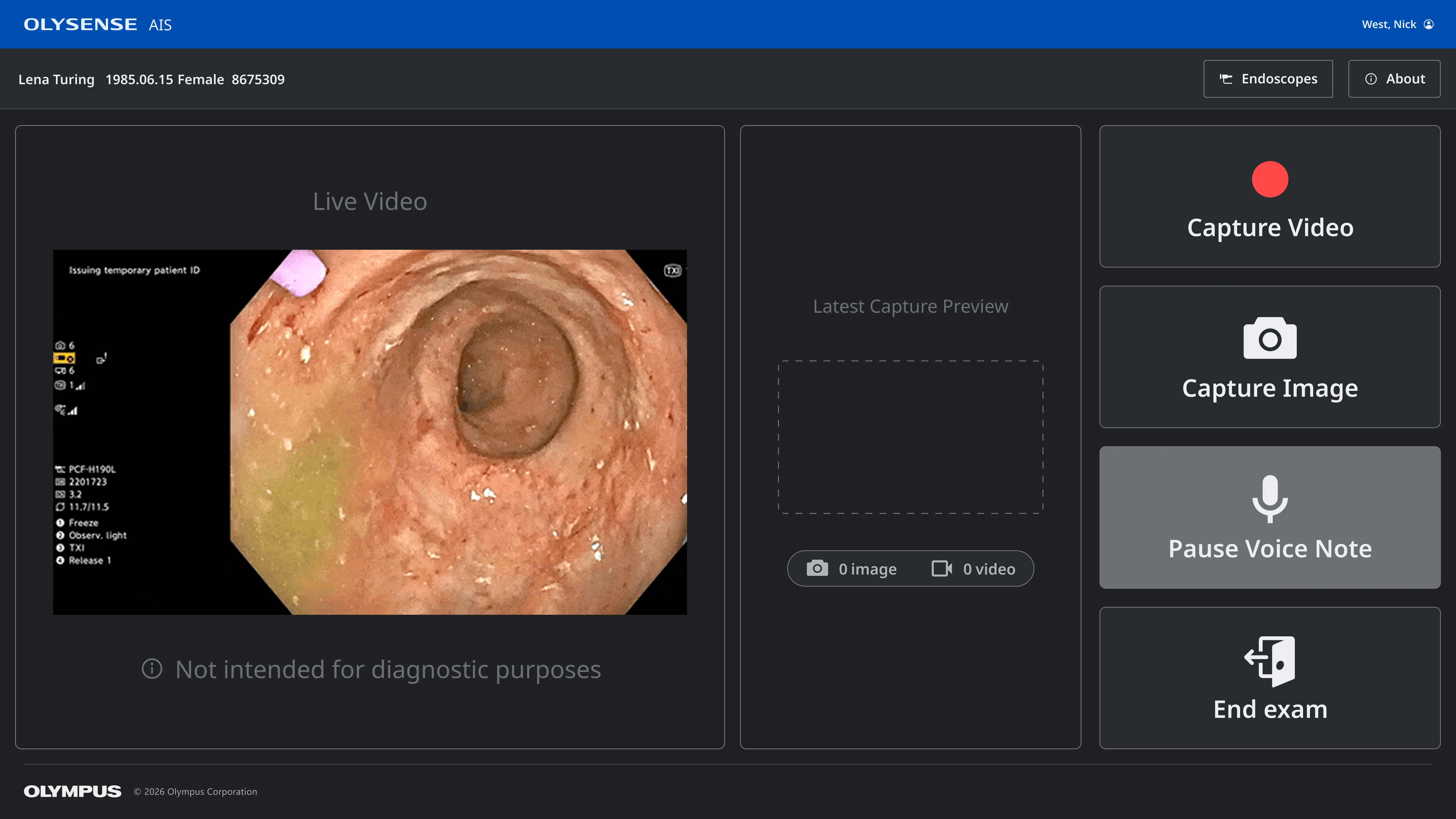
Adding microphone controls to the touch screen interface
The intra-procedure experience used a touch screen connected to the endoscopy tower to capture images and videos. We needed to add microphone controls (in case wake words were not available) and status to thier interface.
Mapping findings to the correct report fields
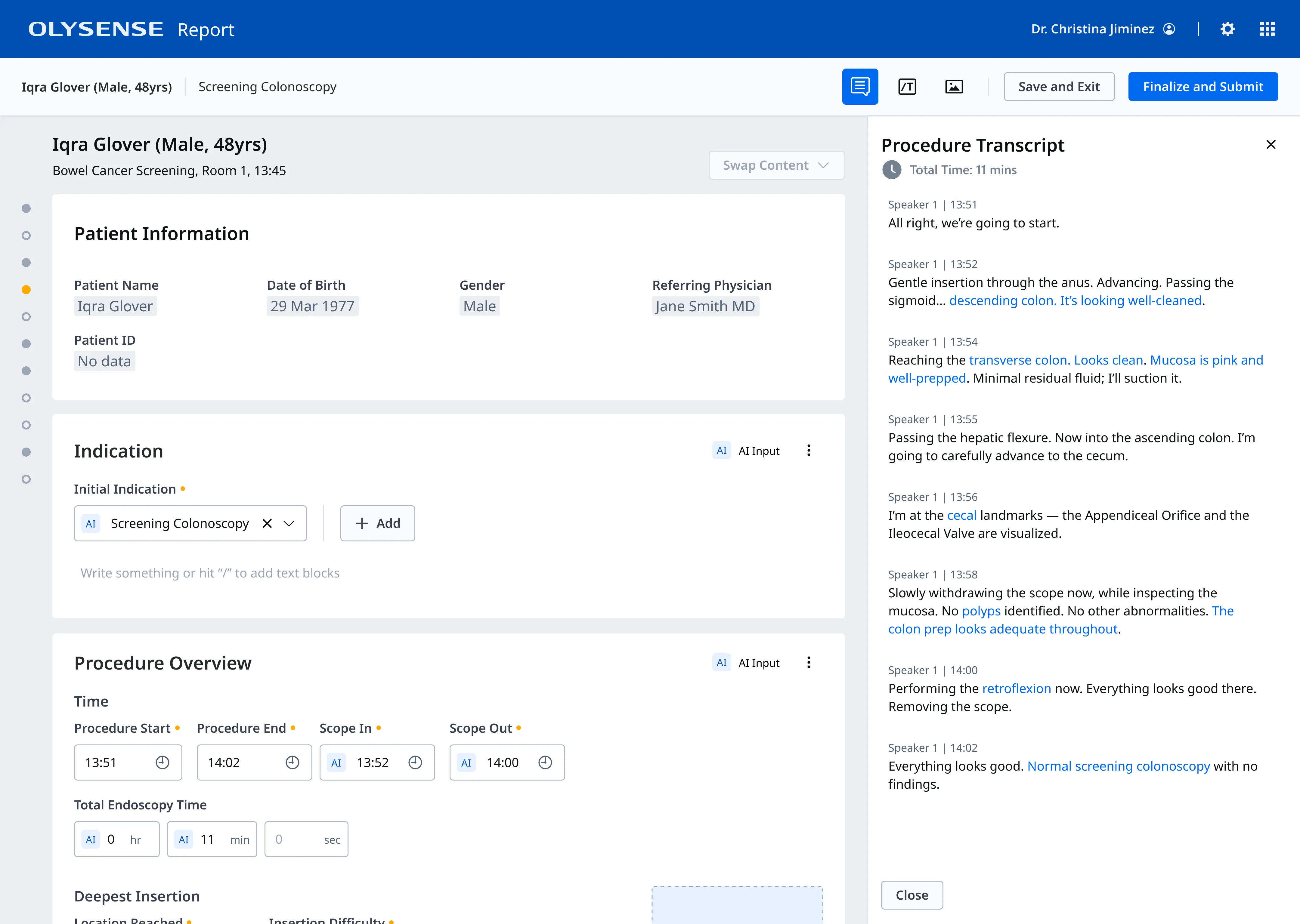
On the post-procedure report, I partnered with the designers on the report team to define how the data would flow from the backend to the report, ensuring that it mapped to the correct fields and formatted the findings with the correct structure.
Adhering to EU regulations for AI and medical devices
We also collaborated closely with our internal regulatory team to ensure we were meeting the guidelines for AI use in the medical field for all the jurisdictions where we planned to sell our voice solution. In order to meet these requirements, our designs had to clearly indicate which fields were populated by AI and include a disclaimer that all AI content be carefully reviewed by a physician.
Faster documentation leads to reduced cognitive load and less burnout
Our user research team performed in-person testing of the end-to-end reporting experience and physicians were very impressed with both the voice caapture technology and the overall ability to reduce the reporting burden and cognitive load. They anticipated that the voice feature would save them a significant amount of time and allow them to devote more time to patient care.
[Voice reporting] would give us a lot of time to explain to the patient properly what we did or to do things in the proper way, because sometimes we’re in a rush and we don’t have enough time to do all the things we have to do.
The voice scribe and improved reporting experience are expected to ship in October 2026.